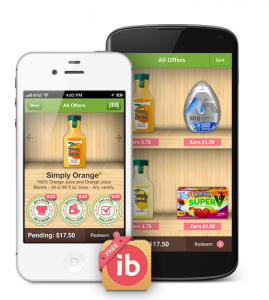
Have you heard of IBOTTA yet? It is a NEW Smartphone Coupon & Savings App that you’ll definitely want to download. It’s a simple way to earn cash back when you shop – right into your PayPal account!
Not only does it offer coupons, but there are also ways to earn by taking polls or watching videos.
Here’s how it works:
- Sign up for IBOTTA and download the app on your smartphone.
- Before you head to your participating store (Target, Walmart, CVS, Walgreens & more), check for offers on your favorite products and click REDEEM.
- After shopping, take a picture of your receipt, upload it and earn cash (aka PayPal deposit)
This is similar to other earning programs like SavingStar – another of my favorite ways to earn cash back when I shop!
Bummer – only works with Android and iPhone. I have a Windows phone so no Ibotta for me. 🙁
I am sure I didn’t get the $5 credit – it only shows the $1 redemption from the offer I redeemed after my trip to Target.
I followed your link but not sure I’m getting the $5. How or when does the $5 credit show up? Am I missing something?
Thanks!
You’ll need to redeem one of the coupon offers before 1/17 in order for the credit to show up. I’m working on some posts for ideas on where to find good deals with the app – hope that helps!
Thank you! I will do that. Looks like a great app…thanks for posting about it.
I read this yesterday but totally screwed up by looking up Ibotta on Itunes and so I’m sorry you didn’t get my referral 🙁 Plus, it looks like I’m now not eligible for the $5 credit! But thanks anyway, I think I’m going to like this!
Are you sure you aren’t eligible, Amy? The credit won’t show up until after your first coupon redemption which needs to take place by 1/17.
Honestly – I’m not sure if you need to sign up through my link or not to get the credit.